It asks before it guesses
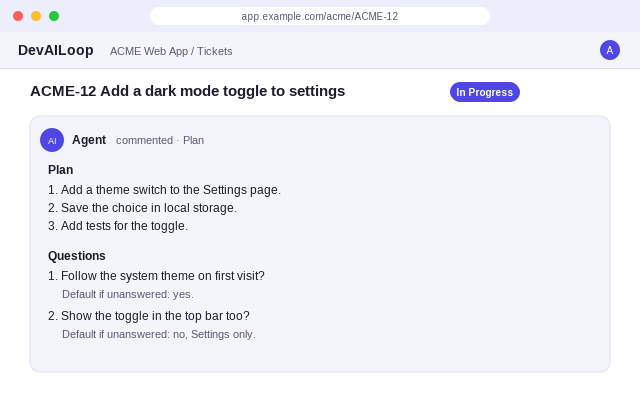
When a wrong guess would change what gets built, the agent asks you numbered questions, each with a stated default. Otherwise it posts its plan and assumptions and gets on with it.
From idea to ticket to reviewed change
DevAILoop is a work tracker with an AI developer built in. Shape a rough idea into a plan, raise tickets, and the agent builds each one on its own branch, checks its work and hands it back for a person to approve.
Your code never touches our servers. It is built on your own machine, in a sandbox, and goes only to your GitHub and the AI model you choose, which can even be a local LLM.
Free trial and paid plans coming soon.
When a wrong guess would change what gets built, the agent asks you numbered questions, each with a stated default. Otherwise it posts its plan and assumptions and gets on with it.
A separate AI code review comes first, then your own test command. Failures that were already on main are told apart from new ones, and real failures go back to the agent.
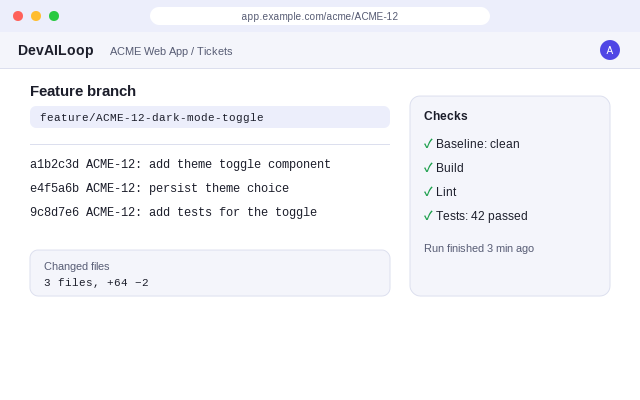
Work lands on its own feature branch with ticket-numbered commits, and comes back as a pull request. Big tickets are split into sub-tickets that are built one at a time.
Unrelated problems the agent finds are filed as their own tickets instead of being slipped into your change.
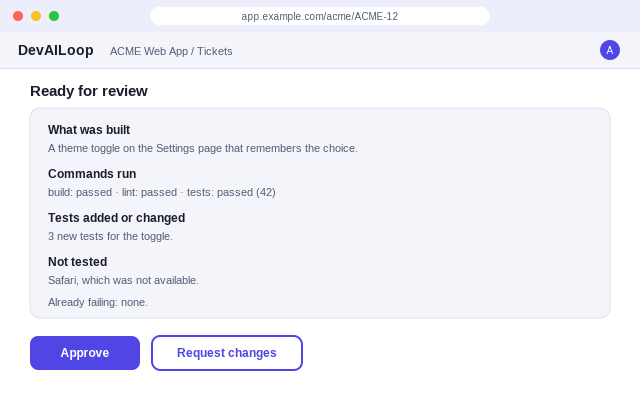
Each report says what was built, what was run and what was not tested. If you do not accept it, the agent works through your pull request comments, and it resolves merge conflicts when you approve.
Tickets turn into changes ready for review. Queue a run of tickets in an Iteration and let them build one after another.
Your code, keys and GitHub credentials stay on your machine. The agent runs in a sandbox with only the access you allow, and the AI model can be a local LLM.
Nothing is merged until someone has read the report and the pull request and pressed approve.
Each run has spend, turn and time limits, and an AI usage report shows estimated cost and tokens by model, step and ticket.
An idea ticket writes no code: the agent thinks it through with you, then files the tickets for the work. Review the plan first.
Everything below is built and working today.
| Area | Feature | What it does |
|---|---|---|
| Planning | Tickets and sub-tickets | Stories, bugs and ideas, with comments and a full history on each ticket. |
| Planning | Idea tickets | The agent thinks an idea through in stages, checks in with you, then files up to 10 tickets for the work. No code is written. |
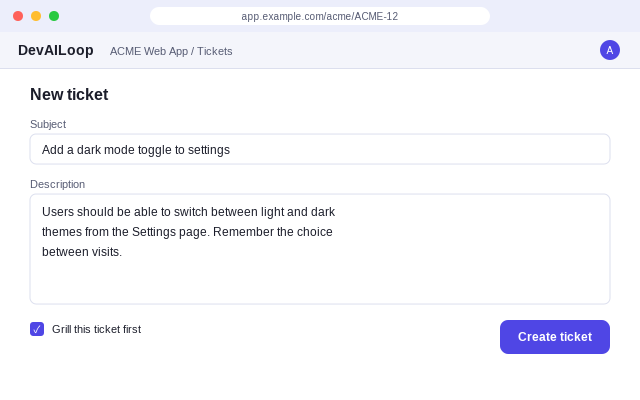
| Planning | Grilling | Optional for stories and bugs: the agent settles every decision with questions and a stated default before building. |
| Planning | Backlog, Features and links | A backlog in priority order, Features to group related tickets, and Blocked by links between tickets. |
| Planning | Iterations | An ordered set of tickets built, reviewed, approved and merged one after another. Run one unattended and the agent takes its stated defaults and records them. |
| Planning | Project memory | Shared notes every agent session gets. The agent suggests changes and a person accepts or rejects them. |
| Building | Branch per ticket | Each ticket is built on its own feature branch in a sandboxed container, with ticket-numbered commits. |
| Building | Bugs done properly | The agent finds the root cause first, then fixes it and adds a regression test. |
| Building | Your instructions | Per-project agent instructions, plus your repository's own CLAUDE.md or AGENTS.md. |
| Building | Project Environment | A Dockerfile per project with the toolchains its builds need, checked against the sandbox, with an optional virtual display for GUI tests. |
| Quality | AI code review | Every ticket gets a separate AI review before a person sees it. The reviewer passes it or proposes fixes as sub-tickets. Enhanced code review checks each requirement and traces callers and data flow. |
| Quality | Tests | Your test command runs on the branch. Flaky failures are re-run, failures already on main are not blamed on the change, and real ones go back to the agent. |
| Review | Review report and pull request | A written report of what was built, what was run and what was not tested, next to a GitHub pull request. |
| Review | Approve and merge | Approving merges the pull request. A separate AI session resolves merge conflicts, and tests run again on the merged result. |
| Review | Not accepted | Send it back with a reason and the agent works through your pull request comments on the same pull request. |
| AI assistance | Project Chat and Ticket Chat | Ask about your tickets, and have tickets created, edited, commented on or cancelled for you. Read the code read-only. |
| AI assistance | MCP endpoint | Outside AI agents such as Claude Code can manage tickets with an API token. |
| AI assistance | Skill packages and models | Choose the skills for grilling and code review per project, and the AI model per project and per workflow step. |
| Running it | Workers where you want them | On your PC with Docker, in your own AWS account (scales to zero when idle), or on Kubernetes. Workers update themselves without dropping runs. |
| Running it | Claude key or subscription | Use a Claude API key or a Claude Pro or Max subscription, or a local LLM for the build step. |
| Security | Your code stays with you | The server holds no Claude or GitHub credentials and runs none of your code. Workers only connect outwards, and the sandbox reaches only the hosts you allow. |
| Control | Roles and tokens | Admin, Project Admin, Default User and Read Only roles, invite links and API tokens. |
| Control | Cost limits and reporting | Spend, turn and time caps on every run, and AI usage reports by day, model, workflow step and ticket. |
| Control | Visibility | An activity log for each run, and every comment, status move and summary on the ticket. |
| Control | Getting started | A Get started page that guides the worker setup. |
Start free, then choose the plan that fits your organisation.
Coming soon
Coming soon
Coming soon
Coming soon
Coming soon
Coming soon
The free trial is coming soon. See your first ticket come back ready for review.
Coming soon